5 Using SQL from Code
Portions of these notes are based on material co-developed with Christopher Genovese for 36-750.
It’s nice to be able to type queries into psql and see results, but most often you’d like to do more than that. You’re not just making a database to run handwritten queries – you’re using it to store data for a big project, and that data then needs to be used to fit models, make plots, prepare reports, and all sorts of other useful things. Or perhaps your code is generating data which needs to be stored in a database for later use.
Regardless, you’d like to run queries inside R, Python, or your preferred programming language, and get the results back in a form that can easily be manipulated and used.
Fortunately, PostgreSQL – and most other SQL database systems – use the client-server model of database access. The database is a server, accessible to any program on the local machine (like the psql client) and even to programs on other machines, if the firewall allows it.
5.1 SQL in Python
Psycopg is a popular PostgreSQL package for Python. Check out the reference guide for full documentation of all its functions and features. It can be installed by using
pip install "psycopg[binary]"Pyscopg is based on two core concepts: connections and cursors. Both are represented by Python objects. A connection object represents your connection to the database server, and allows you to create transactions and commit them. A cursor object represents one particular interaction with that connection: you can submit a query, then use the cursor to fetch its results.
To connect:
import psycopg

conn = psycopg.connect(
    host="pinniped.postgres.database.azure.com", dbname="yourusername",
    user="yourusername", password="yourpassword"
)
conn is now a connection object. (See Section 5.2 below on how to store your password securely; including it directly in your Python files is not a good idea.) We can create a cursor and use it to submit (“execute”) a query:
cur = conn.cursor()

baz = "walrus"
spam = "penguin"

cur.execute("INSERT INTO foo (bar, baz, spam) "
            "VALUES (17, %s, %s)", (baz, spam))
Notice the use of interpolation to put variables into the query – see Section 5.3 below. Thou shalt not concatenate values directly into the SQL string.
If we do a SELECT, we can get the results with a for loop or the fetchone and fetchmany methods:
# Python concatenates adjacent string literals, which makes it
# easy to split queries across lines:
cur.execute("SELECT time, persona, element, score "
            "FROM events")

# iterating over tuples; each tuple is one row:
for row in cur:
    # Destructuring lets us assign each tuple entry to a variable
    time, persona, element, score = row

    # do something with the results here

# alternately, one at a time:
row = cur.fetchone()
The execute method is used regardless of the type of query.
If you use pandas for your data frames, you can also convert the results of any query directly into a pandas data frame:
import pandas as pd

d = pd.read_sql_query("SELECT persona, element FROM events WHERE id = %(id)s",
                      conn, params = {'id': 17})
The psycopg3 package automatically starts a SQL transaction (Section 4.2) when you create a connection with psycopg.connect(). You must explicitly commit the transaction if you are inserting data:
for event in events:
    cur.execute("INSERT INTO events (...)")

conn.commit() # commit transaction
conn.close() # close connection
If you do not explicitly commit the transaction, it will be rolled back when your script exits.
5.2 Storing your SQL password
The code above stores your password right in the source file. This is a bad idea. If the code is ever shared with anyone, posted online, or otherwise revealed, anyone who sees it now has your database username and password and can view or modify any of your data. If you commit the file to Git, your password is now in your Git history forever. Fortunately, there are ways to work around this.
A simple approach is to create a file called credentials.py that looks like this:
DB_USER = "yourusername"
DB_PASSWORD = "yourpassword"
Then, in other files, you can use import credentials and use credentials.DB_PASSWORD instead of writing in your password. Add credentials.py to your .gitignore to avoid accidentally committing it.
Large companies often use systems for managing passwords and tokens required by scripts, such as Vault or cloud-specific systems like Azure Key Vault and the AWS Secrets Manager. These are much better than creating hidden files.
5.3 Practicing safe SQL
Suppose you’ve loaded some data from an external source – a CSV file, input from a user, from a website, another database, wherever. You need to use some of this data to do a SQL query.
cur.execute("SELECT * FROM users WHERE username = '" + username + "' " +
            "AND password = '" + password + "'"))
Now suppose username is the string '; DROP TABLE users;--. What does the query look like before we send it to Postgres?
SELECT * FROM users
WHERE username = ''; DROP TABLE users; -- AND password = 'theirpassword'
We have injected a new SQL statement, which drops the table. Because -- represents a comment in SQL, the commands following are not executed.
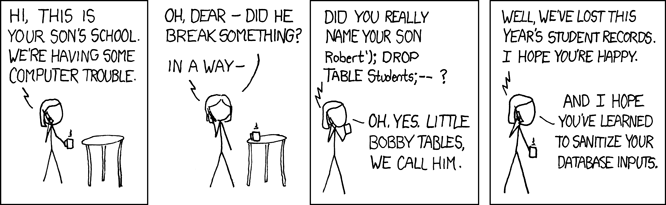
Less maliciously, the username might contain a single quote, confusing Postgres about where the string ends and causing syntax errors. Or any number of other weird characters which mess up the query. Clever attackers can use SQL injection to do all kinds of things: imagine if the password variable were foo' OR 1=1 – we’d be able to log in without knowing the right password!
(For a time in the early 2000s, SQL injection was incredibly common, and numerous services were hacked using it. It still crops up when unwary developers don’t think about their queries.)
We need a better way of writing queries with parameters determined by the code. Fortunately, database systems provide parametrized queries, where the database software is explicitly told “this is an input, with this value” so it knows not to treat it as SQL syntax. For example:
username = "'; DROP TABLE users;--"
password = "walruses"

cur.execute("SELECT * FROM users "
            "WHERE username = %(user)s AND password = %(pass)s",
            {"user": username, "pass": password})
In this form, psycopg sends the query (with placeholders) and the values separately, so that the SQL server knows which parts are values and which parts are part of the SQL syntax. It is impossible for anyone to maliciously slip different SQL syntax into your queries.
Consult the psycopg documentation on query parameters for more details and options.
You should always use this approach to insert data into SQL queries. You may think it’s safe with your data, but as the documentation notes:
Don’t manually merge values to a query: hackers from a foreign country will break into your computer and steal not only your disks, but also your cds, leaving you only with the three most embarrassing records you ever bought. On cassette tapes.
If you use the
%operator [or f-strings] to merge values to a query, con artists will seduce your cat, who will run away taking your credit card and your sunglasses with them.If you use
+to merge a textual value to a string, bad guys in balaclava will find their way to your fridge, drink all your beer, and leave your toilet seat up and your toilet paper in the wrong orientation.
You may find older code that does not use parametrized queries, but instead concatenates queries together with escapes. In short, before concatenating values into a query, you check that their types match what they should be (e.g. integer values really are integers), and for strings, you replace ' with '', the escape for representing ' within a string. Then you concatenate.
psycopg doesn’t actually contain a function for escaping strings, because it’s too easy to mess up and forget to escape something, or to escape something incorrectly—just use a parametrized query, which cannot go wrong. But you may find escaping commonly used in other languages.1 If you’ve ever seen text with apostrophes come out of a website with extra backslashes, you’ve seen a poorly done escaping system (as other SQL databases use \' to escape single quotes).
Exercise 5.1 (SQL injection) Suppose we have a users table with username, email, and admin columns. The admin column is a boolean (true/false) that determines whether the user has administrative privileges in the application.
The application includes a form to update your email address. When you submit the form, it does the following:
cur.execute("UPDATE users "
            "SET email = '" + email_address "' "
            "WHERE username = '" + username + "'")
Suggest an email address and username to submit so that your user account will be given administrative privileges.
5.4 Handling errors
Query errors are converted into Python exceptions. For example, here I’m trying to insert a country that’s already in the countries table, and the country code is defined to be a primary key, so it must be unique:
In [7]: cur.execute("INSERT INTO countries (country_code, country_name) VALUES ('us', 'Estados Unidos')")
---------------------------------------------------------------------------
UniqueViolation                           Traceback (most recent call last)
<ipython-input-7-5df5a6b218e6> in <module>
----> 1 cur.execute("INSERT INTO countries (country_code, country_name) VALUES ('us', 'Estados Unidos')");

~/miniconda3/lib/python3.6/site-packages/psycopg/cursor.py in execute(self, query, params, prepare, binary)
    546                 )
    547         except e.Error as ex:
--> 548             raise ex.with_traceback(None)
    549         return self
    550

UniqueViolation: duplicate key value violates unique constraint "countries_pkey"
DETAIL:  Key (country_code)=(us) already exists.
You can use Python’s exception management features (try, except, finally, etc.) with these exceptions just like with any others:
try:
    cur.execute("INSERT INTO countries (country_code, country_name) "
                "VALUES ('us', 'Estados Unidos')")
except psycopg.errors.UniqueViolation as e:
    # do something with the exception here
See the Python errors and exceptions tutorial for more information.
Notice that the exception is a UniqueViolation. Psycopg translates Postgres error codes into distinct Python exceptions, so if you use except to catch them, you can catch different types of Postgres errors and handle them differently. The psycopg.errors module defines the exception types that are available.
If an error occurs in any query in your transaction, any subsequent queries will produce errors like:
InFailedSqlTransaction: current transaction is aborted, commands ignored until end of transaction blockThis means you need to call conn.rollback() to roll back the transaction explicitly so you can start over. Or you can use the transaction features described below.
Exercise 5.2 (Handling SQL errors) Load the events data into your own database so that you have permission to edit it. (You can open the SQL file in Azure Data Studio to run it in your database, creating the table.)
Write a short Python script using psycopg to connect to the database. Have the script issue an INSERT query that causes a foreign key constraint violation. Use try and except to catch the exception and print a message about the error.
Your script should only catch foreign key constraint violations, and not, say, SQL syntax errors or other unrelated problems.
5.5 Transactions in Python
Psycopg provides convenient ways to manage transactions (Section 4.2). (See the psycopg manual chapter for full details.)
The most convenient method is with transaction contexts. Python provides a feature called context managers that allow actions to be automatically run to create and destroy resources, and psycopg reuses these to create and commit (or rollback) transactions. Context managers are created with the with statement.
For example:
conn = psycopg.connect(...)
cur = conn.cursor()

with conn.transaction():
    # This creates a new transaction

    cur.execute("INSERT INTO foo ...")
    cur.execute("INSERT INTO bar ...")

# Now the block is done and committed. But if there was an exception raised in
# the block that was not caught, the context manager would automatically call
# conn.rollback() for us.
What’s great is that these can be nested! For instance, suppose you’re loading lots of data by looping through a data file doing INSERT. You want the entire data to be loaded or not loaded; you don’t want it to crash halfway through and only half the data is loaded. But you also want to recover from bad rows and keep inserting the rest. You could do the following:
num_rows_inserted = 0

# make a new transaction
with conn.transaction():
    for row in big_data_set:
        try:
            # make a new SAVEPOINT -- like a save in a video game
            with conn.transaction():
                # perhaps a bunch of reformatting and data manipulation goes here

                # now insert the data
                cur.execute("INSERT INTO foo ...", ...)
        except Exception as e:
            # if an exception/error happens in this block, Postgres goes back to
            # the last savepoint upon exiting the `with` block
            print("insert failed")
            # add additional logging, error handling here
        else:
            # no exception happened, so we continue without reverting the savepoint
            num_rows_inserted += 1

# now we commit the entire transaction
conn.commit()
This lets us handle errors in individual rows without stopping or losing all the data we have inserted, but still ensures that other users see all or none of the data, not part of it.
5.6 Batching many queries
When the database is on a different machine than your Python script, the delay in sending messages between them can become a problem. Each time you use cur.execute() to run a query, your Python script must send several messages to Postgres with the query and the parametrized data; then it must wait for PostgreSQL to send back the results and indicate it’s ready for the next query.
From the CMU network to our Azure database server, I measured a 25-millisecond round trip. That means it takes 25 milliseconds to send a message and get a response back, even when the response is sent instantly. The round-trip time to a server in the UK was closer to 100 milliseconds; if you’re on crappier Internet than the CMU connection, you can easily have 200-millisecond round trips to some servers.
That means every query to our Azure database must take at least 25 milliseconds, plus whatever time it takes Postgres to do the actual work. That imposes a limit of 40 queries per second—lower if your Internet is slower or if the queries take Postgres some time to execute.
This is a problem if we’re executing large batches of queries, e.g. if we’re sending many INSERT commands to load lots of data. Being limited to 40 rows per second when you have thousands of rows is a big problem.
Fortunately there is an alternative. PostgreSQL now supports pipeline mode. In this mode, you can send a stream of many queries to Postgres without waiting for their results; Postgres will send the results back to you as they become available. You could send a batch of 100 without having to wait \(100 \times 25\) milliseconds (2.5 seconds!), and only wait briefly at the end to receive the final confirmation that they’re done.
Pipeline mode can be invoked manually (see the manual page), but it can also be done with the executemany() method. For example:
cur.executemany("INSERT INTO tablename (foo, bar, baz) VALUES (%s, %s, %s)",
                [("foo for row 1", 9, "baz1"),
                 ("foo for row 2", -9, "baz2"),
                 ("foo for row 3", 16, "ducks")])
As of psycopg version 3.1, this automatically sends the batch of rows in pipeline mode. Each entry in the list is a tuple of values defining one row; the query is hence sent three times.
This can be used for INSERT queries or any other query where you want to run the same query many times with different values.
5.7 Building automated workflows
There are a few common use-cases for using SQL within Python code (or other languages):
- Supporting an interactive application, like a web site or an app. The program responds to actions by the user by performing SQL queries and displaying the results. Facebook, for instance, originally stored all its posts and comments in a SQL database, so viewing the website or app involves running many SQL queries to fetch content to display.
- Automating tasks that are done occasionally. For example, I might occasionally have to set up accounts for MADS students on a database server, so I could write a Python script that loops over the course roster and runs the necessary commands for each student.
- Automating workflows that run on a schedule, such as a data pipeline that gets the latest data from several sources, processes it, and loads it into a database.
The integrity and error-handling requirements for these cases can vary, and so part of your design process is to consider how to handle problems. For example:
- In an interactive website, recovering from errors may not be important; if the system isn’t working, you can check your Facebook feed later. Simply catch exceptions and display an error message to the user. It may also be helpful to log detailed information about the error to a file so that the software developer can debug it later.
- In a manually run task, like loading new users, it may be best to present the error to the user, let them fix any issues, and then let them start over. That means not partially loading data or leaving the task half-done, because then redoing it is much harder.
- But a scheduled workflow may be used for many other tasks later: your data pipeline loads data that an automated reporting system uses, and its reports get sent to another system for analysis, and so on. If your job fails, the downstream tasks can’t run at all. If there’s a problem loading one or two rows of data, you may want to load the rest so the other jobs can run on schedule – but record which data failed to load so an analyst can examine it, fix the problem, and manually add it later. But if the integrity of the later analyses depends on loading everything perfectly – as in an accounting system – you may have to catch the error, roll back, and alert someone to investigate.
In each case, the decision depends on the task requirements. In some tasks, the integrity of data is key, and any error indicates a serious problem that must be fixed before the database can be updated; in others, minor issues can be bypassed for later investigation.
5.8 Exercises
Exercise 5.3 (Automated reporting) Write a Python script called event-report.py. This script should take a command-line argument specifying a date (such as 2015-03-23), so it can be invoked like this:
python event-report.py 2015-03-23When it runs, it should connect to the Postgres database and query the events table for all events in the week preceding the given date. It should produce a table of the top 10 students that week, ranked by their cumulative scores on all events during that week. The table should include their name, birthday, score from that week, rank, and overall average score across all weeks.
Print this table out as a nicely formatted table. The tabulate package can help format it, or you can use the pandas to_string() method if you have a pandas data frame.
Once your code works, paste it into a notebook cell to submit with your homework. Include a text cell with the formatted output from your script, run with 2015-03-23 as the date.
Exercise 5.4 (NBA teams) The nba-teams.txt data file contains information about each team in the NBA.
Write a table schema to store this data. Provide the CREATE TABLE command with your submission. Include a primary key and appropriate NOT NULL constraints. Consider using enumerated types to represent columns that can only take on one of several fixed values (i.e. like a factor in R).
Write Python code to read the data from nba-teams.txt and run a series of INSERT commands to populate the table. The code should loop through the entire file and repeatedly run INSERT. When it’s done, it should print out a summary of how many rows were successfully inserted.
Be sure to commit the transaction so the data is saved to the database.
For example, PHP used to have
mysql_escape_string()to escape strings being sent to MySQL. Except it didn’t keep track of which character encoding was being used, so it could escape strings incorrectly. It was replaced withmysql_real_escape_string(), and eventually by parametrized queries.↩︎